 TabPurr
How the grouping rules work
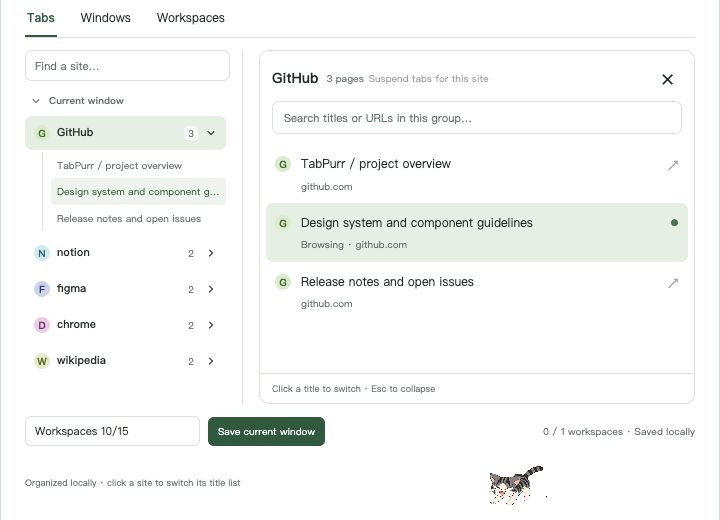
- Registered-domain aggregation:
mail.example.com,www.example.comandexample.comall land in one “example” group. - Two-part suffixes handled:
shop.example.co.ukgroups underexample.co.uk, not “co.uk”. - Shared hosting domains stay separate:
alice.pages.devandbob.pages.devare different sites. - Ports and IPs are their own groups:
localhost:3000never merges withlocalhost:8080. - Recognizable headers: native group titles show a short site name plus an icon (💬 ♪ Ⓖ …) with real favicons in the extension's own tree views.
- Left-side concentration: automatic groups gather after your pinned tabs; you can turn this off in settings.
What it never touches
- Pinned tabs stay pinned and in place.
- Your manual groups keep their names, colors and members , auto-tidying skips them.
- Mixed groups you chose: ⌘/Ctrl-click several tabs, right-click → “merge selected tabs into a mixed group”, and that group stays together (marked as manual) instead of being split by site.
- Your own grouping is off-switchable: auto grouping can be paused in settings at any time; existing groups remain.
Not AI, by design
Grouping is deterministic and transparent: same website → same group, decided by the domain, entirely on your machine. There is no topic classification, no model inference, and no data leaving the browser. If you want tabs grouped by “project” or “mood”, manual groups and the right-click mixed group are the tools for that , the extension keeps out of the way.
The built-in alternative
Without an extension you can group tabs natively: right-click a tab → Add tab to new group, name it, color it, and drag tabs in. For a handful of tabs that's fine. It breaks down when tabs arrive faster than you sort them , every new page starts ungrouped, and nothing re-sorts after a restart. That ongoing maintenance is exactly what automatic domain grouping removes.
Try it
Auto grouping and full-title search are free, forever, and included before any purchase decision.