 TabPurr
How TabPurr saves a window
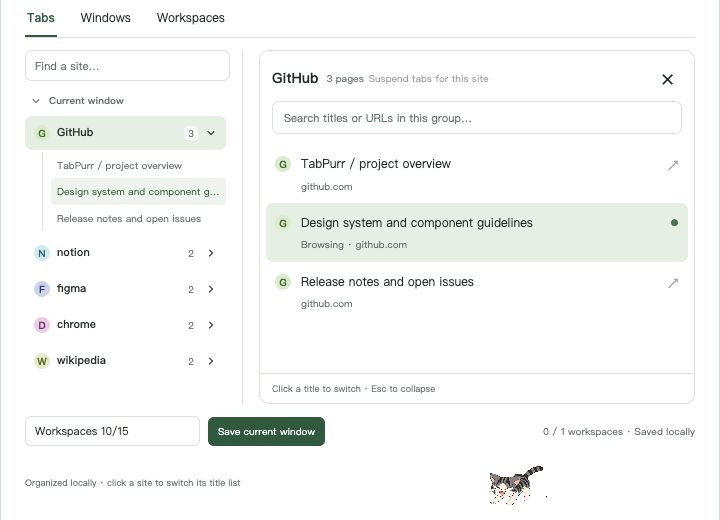
- Click the TabPurr icon in the toolbar (or open the full manager page).
- Choose save current window and give the workspace a name , for example “Thesis research”.
- Close the tabs or the whole window. The workspace keeps every page's title and URL on your machine.
- When you need it again, open the workspace and restore into a new window: all pages reopen and fall back into per-site tab groups automatically.
- Export the workspace as JSON at any time , useful as a plain backup or to move a list of links elsewhere.
Free and Pro
| Free | Pro (US$5.99 one-time) | |
|---|---|---|
| Named workspaces | 1 | 50 |
| Restore into a new window | Yes | Yes |
| JSON export | Yes | Yes |
| Automatic backup history (when enabled) | Hourly, up to 3 records | Every 10 minutes, up to 24 records |
| Manual backups, restore & full JSON export/import | Yes | Yes |
What a workspace keeps , and what it doesn't
- Kept: titles and URLs of the window's http/https pages (up to 200 per workspace), stored only in your browser's local storage.
- Not kept: login sessions, form input, scroll positions, and the names or colors of tab groups you created by hand. Restoring reopens the URLs in a new window and regroups them by site , it is not a byte-for-byte session restore.
- Never uploaded: workspaces live in
chrome.storage.local. There is no sync service, no account, and no copy on any server.
The built-in alternative
Chrome itself can save all open tabs as bookmarks: press Ctrl/Cmd + Shift + D (or right-click a tab → “Bookmark all tabs”) into one bookmarks folder. That works and costs nothing. The trade-offs: your bookmark bar accumulates project folders, reopening gives you a folder of links rather than a grouped window, and there is no overwrite-in-place workflow when a project's tab set evolves. TabPurr workspaces live in the extension instead , save, restore, replace, export , without touching your bookmarks.
Common questions
Does it work offline?
Yes. Saving, restoring, exporting and searching all run locally. Nothing needs the network.
Will it bring back tabs I closed without saving?
When automatic protection is enabled, TabPurr can keep local recovery records for closed windows, whole groups and qualifying batches of tabs. Recovery needs a saved record; it cannot guarantee every unsaved page. You can also try Chrome's Ctrl/Cmd + Shift + T and history for recently closed tabs.
Is this an online tool that reads my tabs from a website?
No. This website is documentation. The actual tab handling happens inside the Chrome extension installed on your machine.